If you run a small business in the UK, you already know how important it is to be found by customers nearby. When someone in your area searches for “plumber near me” or “accountant in Bristol”, you want your business at the top of those results—not buried on page three where nobody’s looking.
That’s exactly what local SEO does. It helps Google understand where you operate and what you offer, so you show up when local customers are ready to buy.
The good news? You don’t need a massive marketing budget or technical wizardry to improve local SEO for small businesses. This guide walks through practical, manageable steps that actually work for small businesses. We’ll focus on the strategies that make the biggest difference, so you can attract more customers in your area without the overwhelm.
Table of Contents
Optimise Your Google Business Profile
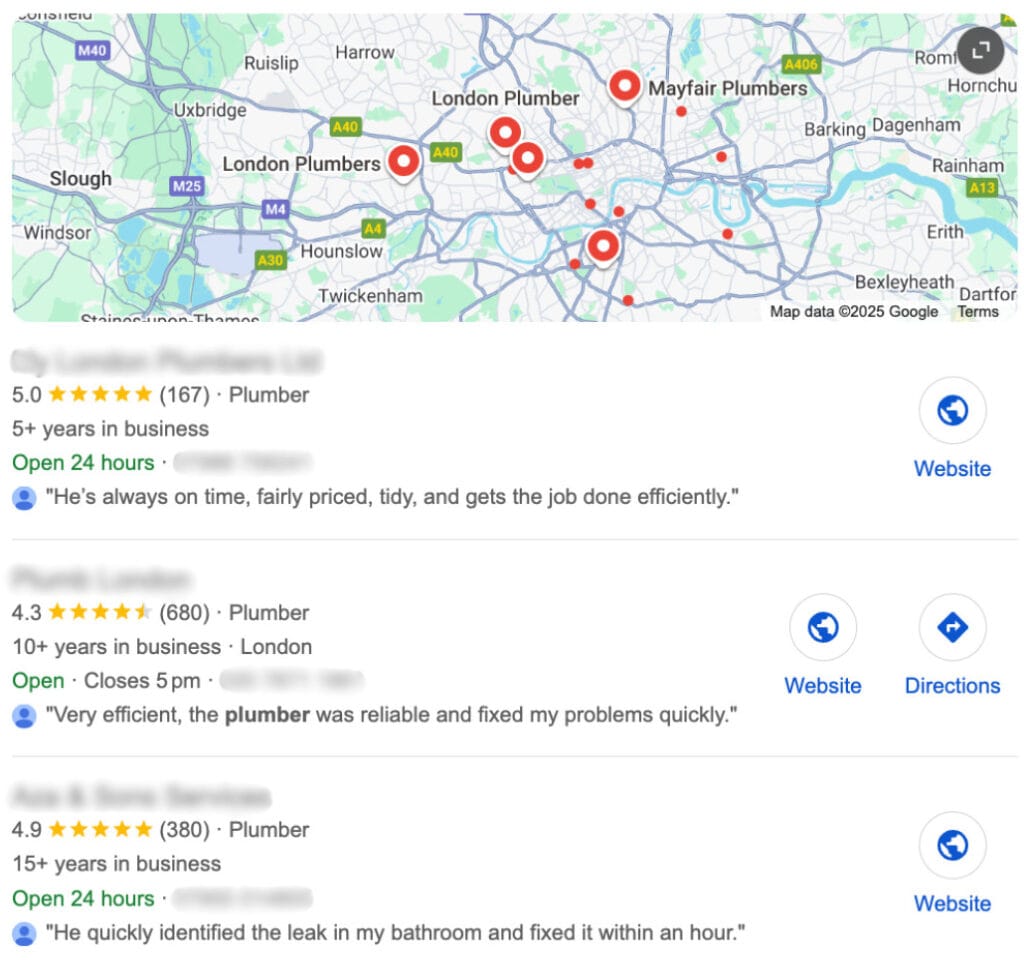
Your Google Business Profile (formerly Google My Business) is the single most important factor for local SEO.
It’s what makes your business appear in Google Maps and the local pack—that box of three businesses that shows up at the top of local search results.
- Claim and verify your profile Head to Google Business Profile and claim your listing. Google will verify your business, usually by sending a postcard with a code to your business address.
- Fill in every section completely Add your business name, address, phone number, website, opening hours, and service areas. The more complete your profile, the more confident Google feels showing it to searchers.
- Choose accurate categories Select a primary category that best describes what you do (e.g., “Electrician” or “Coffee Shop”). Add secondary categories for other services you offer. These help Google understand when to show your business.
- Upload high-quality photos Businesses with photos get 42% more requests for directions and 35% more clicks through to their website. Include photos of your shopfront, team, products, and completed work.
- Write a compelling business description You’ve got 750 characters to explain what you do and what makes you different. Include your location naturally (e.g., “family-run bakery in Hackney”) and the services you offer.
Top tip: Keep your opening hours updated, especially around bank holidays. Google rewards active, well-maintained profiles with better visibility.
Encourage and Respond to Reviews
Reviews directly impact your local rankings. Businesses with more positive reviews typically rank higher in local search results.
Ask happy customers to leave a review on your Google Business Profile. Make it easy by sending them a direct link. The review link is in your GBP dashboard under “Get more reviews”.
Always respond to reviews—both positive and negative. A thoughtful response to a negative review shows potential customers you care about customer service. Keep responses professional, acknowledge the concern, and offer to resolve the issue offline.
Keep Your Business Information Consistent
Google checks if your business details match across the web. Inconsistent information—like different phone numbers or slightly different addresses—confuses search engines and can hurt your rankings.
Make sure your business name, address, and phone number (your “NAP” details) are identical everywhere they appear:
- Your website (especially the footer and contact page)
- Google Business Profile
- Facebook, Instagram, and other social media
- Online directories like Yell, Bing Places, Yelp, and industry-specific sites
If you spot inconsistencies, update them as soon as you can. Even small differences—like “St” versus “Street”—can cause problems.
UK directories to check: Start with Yell, Thomson Local, Bing Places, and Scoot. If you’re a trade business, add Checkatrade, Rated People, or TrustATrader. These citations (mentions of your business) help build your local authority.
Use Location-Specific Keywords on Your Website
Local SEO relies on Google understanding where you operate. Help search engines by naturally including your location in your website content.
Where to Add Location Keywords
- Page titles and meta descriptions – “Emergency Plumber in Manchester | 24/7 Callout”
- Homepage and service pages – Mention the towns or areas you cover
- Headings (H1, H2, H3) – “Carpet Cleaning Services Across Birmingham”
- Image alt text – “Landscaping project completed in Cheltenham”
Write naturally. Don’t force “plumber in Leeds” into every sentence. Instead, weave it in where it makes sense: “Based in Leeds, we’ve been helping local homeowners with boiler repairs for over 15 years.”
Create Location Pages for Multiple Areas
If you serve several towns or neighbourhoods, create dedicated pages for each location. Each page should include:
- Unique, helpful content about that area
- Local landmarks or references customers would recognise
- Reviews or testimonials from customers in that area
- Information about how you serve that specific location
Avoid thin content: Don’t create nearly identical pages that just swap out the town name. Google spots this and may penalise your site. Make each location page genuinely useful.
Build Local Backlinks
Backlinks—links from other websites to yours—tell Google your site is trustworthy and relevant. Local backlinks from websites in your area are especially valuable for local SEO.
How to Get Local Backlinks
- Local news coverage – Got a story? Contact your local paper or news website. Opening a new shop, sponsoring a local event, or achieving something noteworthy can get you featured.
- Local business directories – Get listed in Chamber of Commerce directories, trade associations, and local business networks.
- Sponsor local events or teams – Sports clubs, school events, and community activities often link to their sponsors.
- Partner with other local businesses – Write guest posts, collaborate on events, or feature each other in blog content.
- Local charities and organisations – Support local causes and they’ll often mention supporters on their website.
Focus on quality over quantity. One link from a well-respected local website is worth more than dozens from low-quality directories.
Create Content That Matters to Local Customers
Publishing helpful, locally relevant content positions you as a trusted local business and gives you more opportunities to rank for local searches.
Content Ideas for Local SEO
- Local guides – “Best Dog Walking Routes in Richmond” (for a pet services business)
- Area-specific advice – “Planning Permission Rules in Camden: What You Need to Know” (for builders or architects)
- Local news and events – Write about relevant community happenings
- Customer stories – Share case studies or projects you’ve completed locally
- Local how-to guides – Help people solve problems specific to your area
This content serves two purposes: it attracts local traffic, and it gives you a reason to use local keywords naturally throughout your site.
Make Sure Your Website Works Perfectly on Mobile
More than half of local searches happen on mobile devices. Someone walking down the high street searching for “coffee shop near me” needs your site to load quickly and work flawlessly on their phone.
Google uses mobile-first indexing, which means it looks at the mobile version of your site when deciding how to rank you. If your site doesn’t work well on mobile, your rankings will suffer.
Quick Mobile Optimisation Checklist
- Test your site on your phone—can you easily tap buttons and read text?
- Use Google PageSpeed Insights to check your mobile speed
- Make sure your phone number is clickable (tap to call)
- Keep forms short and simple
- Ensure text is readable without zooming
- Avoid pop-ups that cover the whole screen on mobile
A slow or clunky mobile site frustrates customers and sends them straight to your competitors.
Use Schema Markup for Local Business
Schema markup is code you add to your website that helps search engines understand your business information better. For local businesses, LocalBusiness schema tells Google exactly what you do and where you operate.
Adding schema won’t directly boost your rankings, but it helps Google display rich information about your business in search results—like your opening hours, phone number, and reviews.
You can generate schema markup using Schema.org’s LocalBusiness template or use an SEO plugin like RankMath or Yoast if you’re on WordPress.
Test your schema: Use Google’s Rich Results Test to make sure your markup is implemented correctly.
Stay Active on Social Media Locally
While social media isn’t a direct ranking factor, it supports your local SEO efforts. An active presence keeps your business visible in your community and drives traffic to your website.
Focus on the platforms where your customers spend time. For most local businesses, that’s Facebook and Instagram.
- Share updates about your business
- Post about local events or news
- Engage with local community groups
- Use location tags on your posts
- Respond to messages and comments quickly
Social engagement builds brand recognition. When people see your name online, then spot it in Google search results, they’re more likely to click through.
Key Takeaways
Improving local SEO doesn’t happen overnight, but these strategies work when applied consistently:
- Claim, complete, and actively manage your Google Business Profile
- Keep your business details identical across your website, directories, and social media
- Naturally include location keywords throughout your website content
- Encourage customer reviews and respond to all feedback
- Build relationships with local websites to earn quality backlinks
- Create locally relevant content that helps your community
- Ensure your website is fast and mobile-friendly
Start with your Google Business Profile, fix any NAP inconsistencies, and gradually work through the other strategies. Track your progress by monitoring your Google Business Profile insights and search rankings for local keywords.
Local SEO rewards businesses that provide genuine value to their community—both online and offline.
Frequently Asked Questions

About the Author
Steve Cleverdon is a web designer and local SEO specialist who helps small UK businesses build better websites and improve their visibility on Google. He shares straightforward, practical advice on web design, GBP optimisation, and simple SEO tactics that work.
This article may contain affiliate links. If you buy through them, I may earn a commission at no extra cost to you. Learn more here